If you’re new to investing, eToro offers one of the simplest ways to start buying and trading global assets from a single platform. Whether you’re interested in stocks, ETFs, cryptocurrencies, commodities or indices, eToro’s beginner-friendly interface makes it easy to explore the markets and place your first trade.
If you’ve just opened an account, you might be wondering what all the buttons and features mean. This guide walks you through how to navigate the eToro dashboard, place your first trade, and understand important concepts like 1×, 2× and 5× Buy.
Step 1: Log In to Your eToro Account
After creating and verifying your eToro account, log in to access the main dashboard.
On the left-hand side, you’ll find the main navigation menu, which includes:
- Watchlist – Save assets you want to monitor.
- Portfolio – View and manage your investments.
- Discover – Browse available markets and investment opportunities.
- Search – Find a specific stock, ETF, cryptocurrency or other asset.
- Deposit Funds – Add money to your account before investing.
Familiarising yourself with these sections will make navigating the platform much easier.
Step 2: Explore the Dashboard
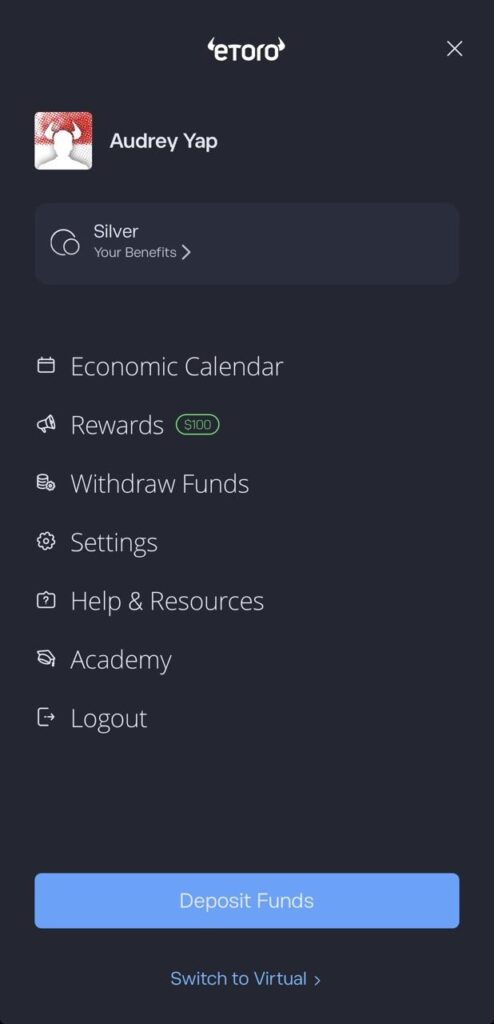
Before placing your first trade, it’s worth understanding what each section of the dashboard does.
Silver Status
At the top of the menu, you’ll see your eToro Club membership level. In this example, the account has Silver status.
eToro Club rewards users based on their account equity. Higher membership tiers may unlock additional benefits such as dedicated customer support, exclusive market analysis, or educational content. The benefits available depend on your account level and the services offered in your region.
Economic Calendar
The Economic Calendar displays upcoming global economic events that may affect financial markets.
Examples include:
- US Federal Reserve interest rate decisions
- Inflation (CPI) releases
- Employment reports
- GDP announcements
If you trade stocks, indices, commodities or currencies, checking the Economic Calendar can help you understand why markets may become more volatile on certain days.
Rewards
The Rewards section shows any promotions, referral rewards, or bonus offers that are available for your account.
These promotions may differ between countries, so Singapore users may not always see the same offers as users in other regions.
Withdraw Funds
This is where you request withdrawals from your available cash balance back to your registered payment method or bank account.
Keep in mind that you can only withdraw available cash. If your money is still invested in stocks, ETFs or other assets, you’ll first need to close those positions before the funds become available for withdrawal. eToro also requires your account to be verified before withdrawals can be processed.
Settings
The Settings page lets you manage your account, including:
- Personal information
- Security settings (such as two-factor authentication)
- Notifications
- Linked payment methods
- Verification details
It’s a good idea to enable all available security features before depositing money.
Help & Resources
If you encounter any issues, this section provides access to:
- eToro Help Centre
- Customer support
- Frequently asked questions
- Account assistance
Most common questions about deposits, withdrawals, verification and trading can be found here.
Academy
The eToro Academy offers free educational content for beginners and experienced investors alike.
You’ll find:
- Investing guides
- Trading tutorials
- Short courses
- Market explainers
- Videos and webinars
If you’re new to investing, spending some time in the Academy before making your first trade can help you better understand how different asset classes and markets work.
Deposit Funds
The blue Deposit Funds button lets you add money to your eToro investment account.
Singapore users can choose from the payment methods supported in their account, such as bank transfer or eligible cards, depending on the available funding options shown during the deposit process. Funds are generally converted into your account’s base currency (USD) before investing.
Switch to Virtual
At the bottom of the menu is Switch to Virtual.
This changes your account from Real Portfolio to Virtual Portfolio, where you can practise investing using virtual funds instead of real money.
This is especially useful if you’re still learning how to place trades, navigate the platform, or test different investment strategies before risking your own capital.
Step 3: Deposit Funds into Your Account
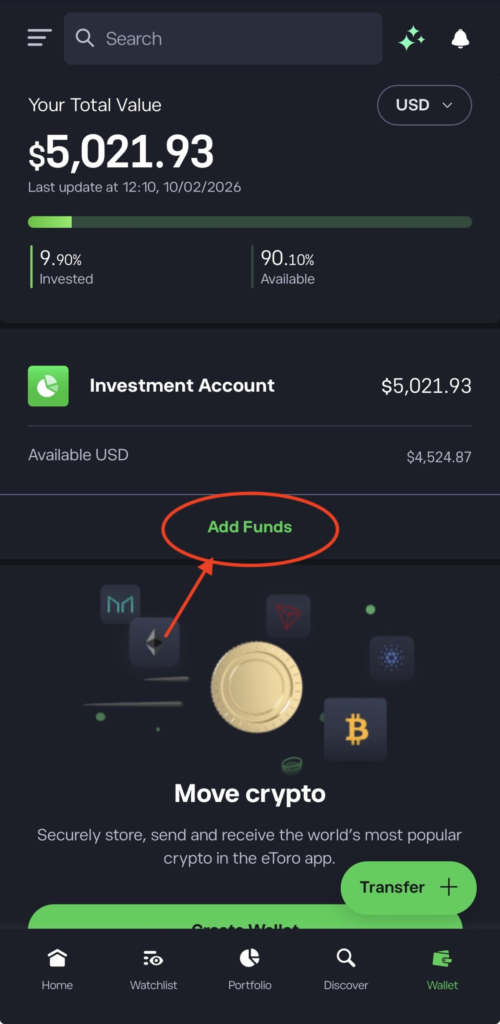
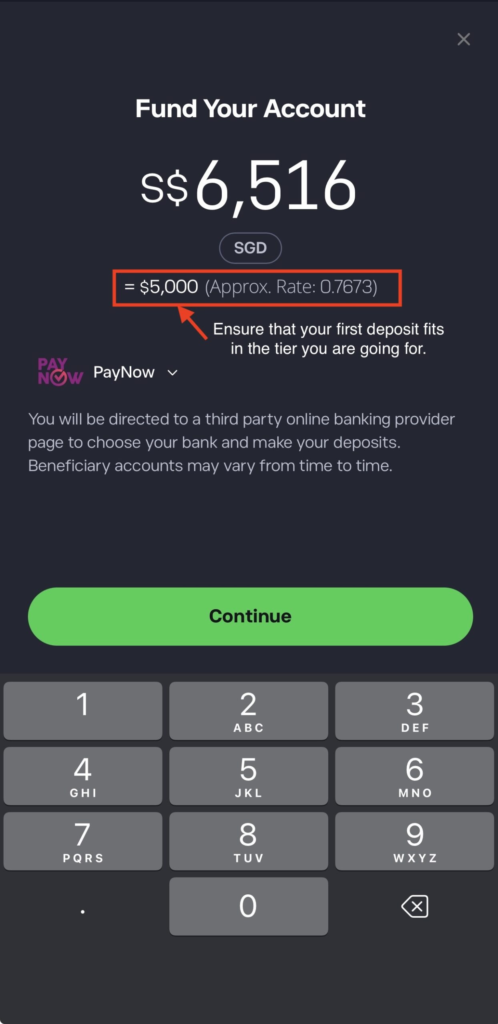
Before you can place a trade, you’ll need to fund your account.
Common payment methods include:
- Bank transfer
- Credit or debit card
- Selected digital wallets (where available)
Keep in mind that eToro accounts are denominated in US dollars (USD). If you deposit Singapore dollars (SGD), your funds are generally converted to USD, and currency conversion fees may apply.
Once your deposit has been processed, your available balance will appear in your account.
Step 4: Find an Investment
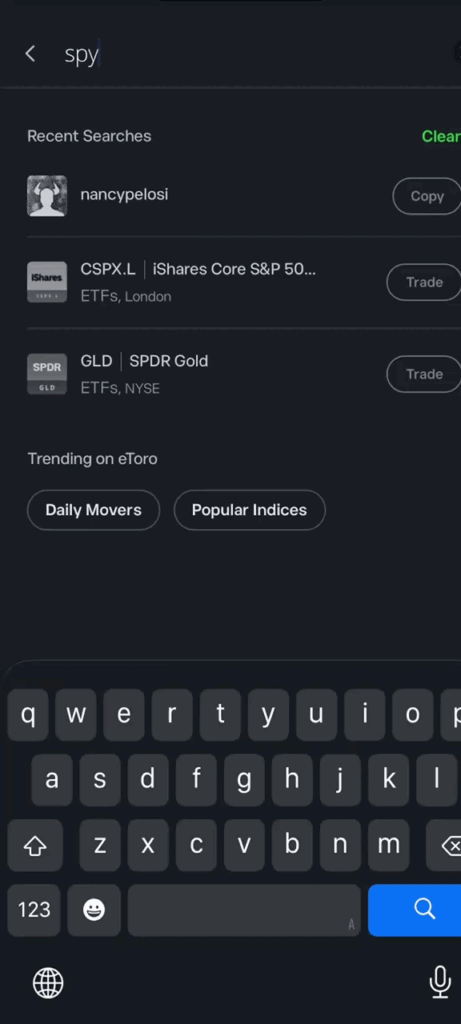
Use the Search bar or browse through the Discover section to find the asset you’d like to invest in.
Clicking on an asset opens its dedicated page, where you can review:
- Live price charts
- Historical performance
- Company or asset information
- Market news
- Key statistics
- Community discussions
Reviewing this information before investing can help you make more informed decisions.
Step 5: Click “Trade”
Once you’ve chosen an investment, click the Trade button.
This opens the trading window, where you’ll customise your investment before submitting your order.
Step 6: Enter Your Investment Amount
For many stocks and ETFs, eToro allows you to invest by dollar amount rather than buying whole shares.
For example, you could invest:
- US$100
- US$500
- US$1,000
This feature, known as fractional investing, makes it easier to start investing even if a single share costs hundreds of dollars.
Step 7: Choose Between a Market Order or Pending Order
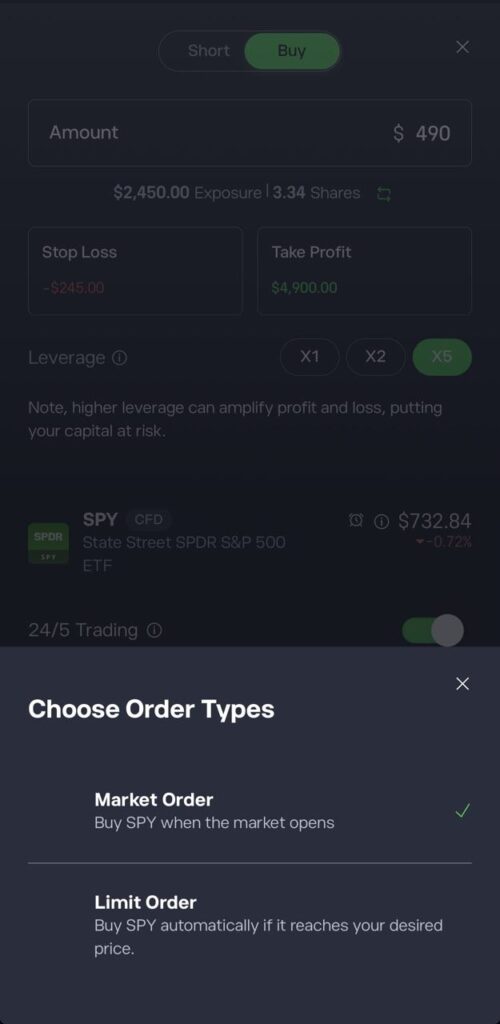
Before confirming your trade, decide how you’d like your order to be executed.
A market order buys the asset immediately at the current market price during trading hours.
If the market is closed, or you’d prefer to buy only when the asset reaches a certain price, you can place a pending order instead. Your order will remain open until the specified conditions are met.
Step 8: Understand 1×, 2× and 5× Buy
One of the most common questions new investors ask is what the 1×, 2× and 5× Buy options mean.
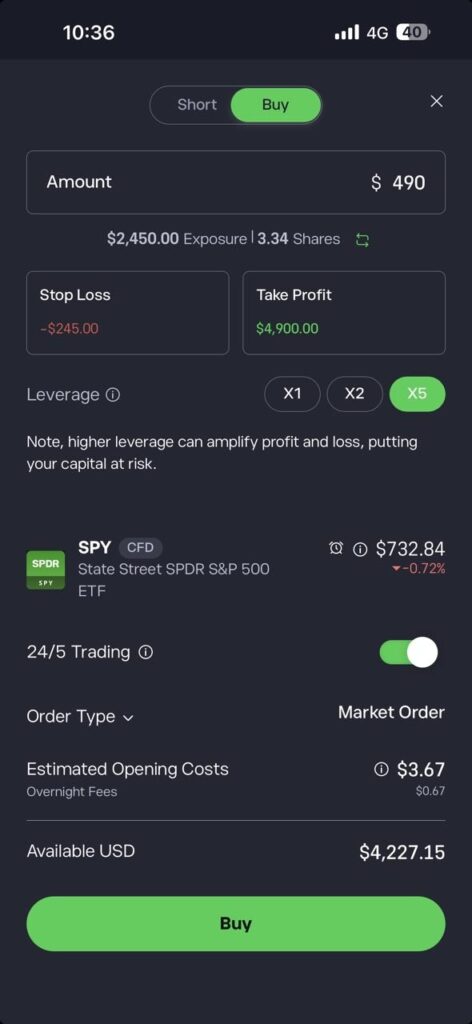
1× Buy
- A 1× Buy means you’re investing without leverage. For many stocks and ETFs, this means you’re purchasing the underlying asset using only your own money.
For example:
- Invest US$500
- If the investment increases by 10%, your position is worth approximately US$550
- If it falls by 10%, it’s worth approximately US$450
However, 1× doesn’t always mean you’re buying the underlying asset. Some investments, such as many indices and commodities, are generally offered as CFDs even at 1×. Always check the trade ticket to see whether you’re purchasing the underlying asset or opening a CFD position.
2× Buy
- A 2× Buy uses leverage. If you invest US$500, your market exposure becomes US$1,000.
- A 10% price increase could generate approximately US$100 in gains, while a 10% decline could result in approximately US$100 in losses.
5× Buy
- A 5× Buy works the same way but increases your market exposure even further.
- For example, investing US$500 with 5× leverage gives you approximately US$2,500 of market exposure.
- If the asset’s price rises by 10%, your position would gain approximately US$250 instead of US$50. However, if the price falls by 10%, your position would also lose approximately US$250.
- Because leverage amplifies both potential gains and losses, 5× Buy is generally better suited to experienced traders who understand the risks involved.
- If you’re new to investing, it’s generally recommended to start with 1× Buy, which doesn’t use leverage and is typically more suitable for long-term investing.
Step 9: Understand When You’re Trading a CFD
When you choose leverage, such as 2× or 5× Buy, your position is generally opened as a Contract for Difference (CFD) rather than purchasing the underlying asset.
Some instruments, including many indices and commodities, are also offered only as CFDs, even when using 1×.
CFDs allow you to speculate on price movements without owning the underlying asset. Because leveraged CFD positions involve borrowed exposure, they carry higher risks and are generally subject to overnight financing fees if held overnight.
If you’re investing for the long term, many beginners prefer unleveraged investments in eligible stocks and ETFs.
Step 10: Set Your Stop Loss
Before opening your trade, you can set a Stop Loss.
A Stop Loss helps limit potential losses by attempting to close your position if the market moves against you.
For example:
- Buy Price: US$100
- Stop Loss: US$90
If the market reaches your Stop Loss level, eToro will generally attempt to close your position at the next available market price. During periods of high volatility, the execution price may differ slightly from your selected level.
Step 11: Set Your Take Profit
A Take Profit automatically closes your trade once your chosen profit target is reached.
For example:
- Buy Price: US$100
- Take Profit: US$120
If the market reaches your target, your position will generally close automatically at the next available market price.
Using both Stop Loss and Take Profit can help manage risk and reduce emotional decision-making.
Step 12: Review Your Trade
Before clicking Open Trade, double-check:
- Investment amount
- Market order or pending order
- Leverage (1×, 2× or 3×)
- Stop Loss
- Take Profit
If everything looks correct, submit your order.
If the market is open, your investment will usually appear in your Portfolio immediately. If you’ve placed a pending order, it will remain open until your conditions are met.
Step 13: Monitor Your Investment
After your trade is open, head to the Portfolio section to monitor its performance.
You’ll be able to view:
- Current profit or loss
- Percentage return
- Entry price
- Current market price
- Total amount invested
You can also add funds to your position, adjust your Stop Loss or Take Profit, or close the trade whenever you wish.
Don’t be surprised if your position initially shows a small unrealised loss. This is often due to the bid-ask spread, which is the difference between the buying and selling price.
Step 14: Close Your Trade
When you’re ready to sell your investment:
- Open your Portfolio.
- Select the investment.
- Click Close Trade.
- Confirm your decision.
Once the trade has closed, any profit or loss becomes realised and is reflected in your available account balance.
Tips for First-Time eToro Investors in Singapore
If you’re just starting out, keep these tips in mind:
- Start with smaller investment amounts while you’re learning.
- Stick with 1× Buy until you’re comfortable with leverage and CFDs.
- Always check whether you’re buying the underlying asset or trading a CFD.
- Research every investment before buying.
- Understand fees such as spreads, currency conversion and overnight financing charges for leveraged CFD positions.
- Invest based on your financial goals and risk tolerance—not market hype.
Final Thoughts
Learning how to trade on eToro is relatively straightforward once you understand the platform’s key features. By taking the time to explore the dashboard, understanding how orders work, and knowing the difference between investing and leveraged CFD trading, you’ll be in a better position to make informed decisions.
For most beginners in Singapore, starting with smaller investments and using 1× Buy is a sensible way to build confidence while learning how financial markets work. As with any investment platform, remember that all investing involves risk, and it’s important to invest only what you can afford to lose while maintaining a long-term perspective.